 Removable media presents a serious potential threat vector for malware to exploit in any manufacturing facility. As a result, it is essential to utilize methods that protect against these threats. The next several blog posts in this series will provide different methods to reduce the risk of a cyberattack using removable media as the launch method. While each solution is beneficial, a defense in depth solution is always recommended.
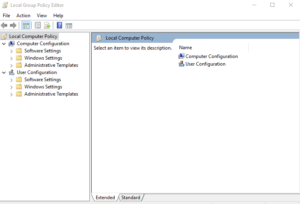
Beginning in Windows 7, Microsoft started including an application called Group Policy Editor as a standard part of Windows. This application allows the user to define policies on the device, such as for Removable Media.
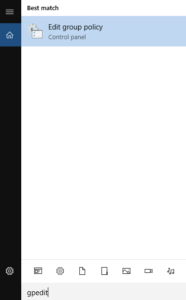 To open the Windows Group Policy Editor (gpedit.msc), open the Search Menu (Win 7 and newer) or the Run application (pre-Win 7). Search for gpedit or run gpedit.msc.
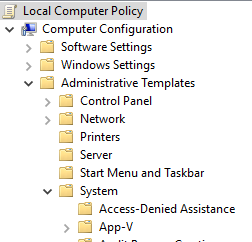 Under Computer Configuration, expand Administrative Templates. Then expand System and select Removable Storage Access.
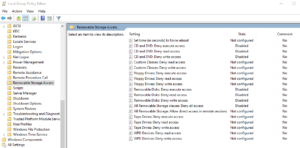
On each of the following policies, click on them, select Edit, change to Enabled, and click Apply, then OK.
For CD and DVD:
- CD and DVD: Deny execute access
- CD and DVD: Deny read access
- CD and DVD: Deny write access
For Floppy drives:
- Floppy Drives: Deny execute access
- Floppy Drives: Deny read access
- Floppy Drives: Deny write access
For USB Devices:
- Removable Disks: Deny execute access
- Removable Disks: Deny read access
- Removable Disks: Deny write access
- All Removable Storage classes: Deny all access
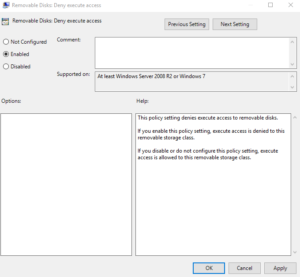
Mobile phones while classified as a type of USB device, do not function quite the same as a flash drive or external hard drive. There is an additional step to prevent the use of mobile phones with the PC.
To secure the device from mobile phones, navigate to the same location under User Configuration and make the same updates as before. This will ensure that mobile phones cannot be connected to the device.





 Why Sandalwood?


 We are a one-stop-shop for launching job rotation for any employer from conception to implementation. Our experts tailor our services to meet the needs of our customers by collaborating with them throughout the entire process. We do not offer cookie cutter solutions for job rotation because the needs of employers vary significantly.
 Why Sandalwood?


 Sandalwood is pleased to offer solutions above and beyond the traditional ergonomic assessments. With an in-depth knowledge of various digital human modelling software suites, integration and adoption to your health and safety programs has never been easier. Sandalwood is experienced in ergonomic program design as well as industry leaders in digital human modelling services. We have a diverse team that is able the leverage the results from the digital human model to provide in depth risk assessments of future designs and current state. Sandalwood is also able to pair these assessments with expertise and provide guidance on the best solution for you. Sandalwood is also on the forefront of emerging technologies and able to integrate Motion capture, Wearables, and extended or virtual reality into your ergonomic program.